

ChatGPT, Claude, Gemini, Copilot, Perplexity, and Mistral's Vibe all promise to answer your questions and write your code. What none of them tell you is what that costs your battery or, in one case, how close your phone comes to just... stopping.
Each test began with a 10 second baseline, then the prompt was entered and the test ended once the LLM finished generating the requested prompt.We included CPU load in these measurements because it's the mechanism behind the battery numbers, when an app's CPU usage spikes, that's the processor doing more work, and more work draws more current. It's why the battery and CPU charts tend to move together throughout this piece.
But before we share our findings, let’s first go through what we tested and how.
TL;DR
30-second summary
What does running an AI app actually cost your phone's battery, and which of the six most popular apps is the most efficient?
- The same prompt produces very different battery costs depending on the app. On a deep search, Claude averaged 947 mW, the lowest of the six, while Mistral's Vibe averaged 2,782 mW. Run continuously, Claude's deep search would last about 14.6 hours versus roughly 5 hours for Mistral.
- Showing an answer costs more than generating it. On Claude, code generation stayed below 9% CPU, but scrolling through the finished response pushed it to 51.7%. Perplexity jumped to 117.5% while auto-scrolling, and network monitors showed no background loading, which points to front-end rendering.
- Mistral's Vibe was the clear outlier under load. During script generation its CPU stayed above 180% for about 25 seconds and peaked at 204.5%, and the tester called the phone "very laggy." Its average CPU across the 49-second run was 114.6%, with peak power reaching 10,495 mW.
- Data transfer and idle behavior varied widely for the same task. Copilot moved 9.1 MB to output a single code snippet, roughly 45 times the 200 KB ChatGPT used, while Gemini transferred just 14 KB. Perplexity also held a 10 to 13% CPU baseline even during rest windows before testing began.
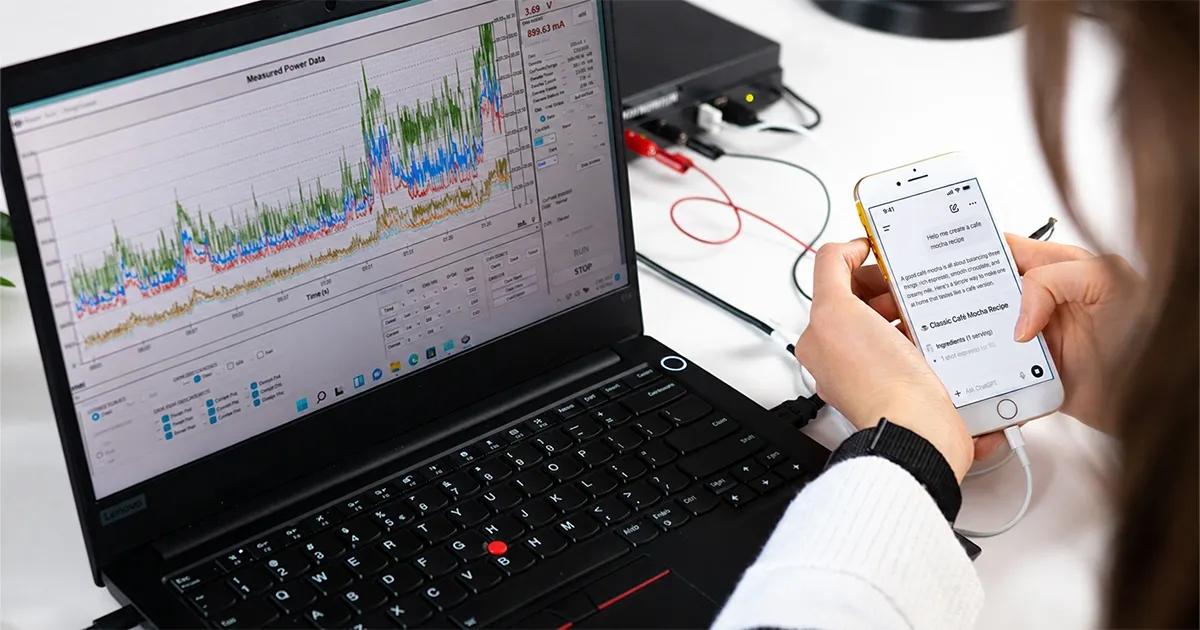
- Hardware-level measurement is what makes the comparison reliable. A Monsoon power monitor wired to the iPhone 16 captured real current and voltage, and Xcode Instruments captured CPU and network activity. Each app ran two scenarios, a deep search and a Python script generation, three times each.
Bottom line: Battery cost has less to do with how capable an AI is and more to do with how the app is built: how much it renders, transfers, and keeps running in the background. The results come from one device, free or mid-tier accounts, and a few manual-interaction caveats, so they are a controlled comparison rather than a universal ranking.
What we actually tested
We ran two scenarios three times per app to capture accurate battery numbers, plus one Instruments trace per app per scenario for detailed CPU and network data:
- Deep search: We asked each app a complex research question that required live web browsing rather than simple memory lookup.
- Script generation: We requested a complex Python script (an in-memory key-value store with transactions and undo/redo functionality), then scrolled through the generated response like a normal user.
All tests were conducted on a default free/mid-tier accounts, mirroring how most people actually use these tools day-to-day.
App versions:
- ChatGPT v1.2026.188+
- Claude v1.260709.0+
- Gemini v1.2026.2370502+
- Copilot v30.0.440721001+
- Perplexity v26.23.0+
- Mistral Vibe v2.5.0+
Test setup:
- Device: iPhone 16, iOS 26.5.2
- Apps tested: ChatGPT (default free model), Claude (Sonnet 5, mid-tier plan), Gemini (Flash 3.6), Copilot, Perplexity, and Mistral's Vibe (all three on their default free tiers)
- Battery draw: measured with a Monsoon power monitor wired directly to the iPhone 16, giving hardware-level current and voltage readings rather than a software estimate
- CPU and network activity: captured with Xcode Instruments from an M1 MacBook connected to the device
- Test window: each run started the moment the prompt was submitted and ended the moment the app finished generating its response - not when the person stopped reading, scrolling, or closed the app
Understanding battery life
Theoretical battery life is how long the iPhone 16's battery (3,561 mAh) would last running one app continuously at its measured average draw, nothing else happening on the phone.
Formula: battery capacity ÷ average current draw.
It's not a real-world estimate, just a clean way to compare apps. Turning milliwatts into hours makes the gap obvious: Claude's deep search would run for 14.6 hours, Mistral's script generation for 4.1 hours.

The app that nearly melted our iPhone
During the script-generation test, Mistral's Vibe kept CPU pinned above 180% for about 25 seconds, peaking at 204.5%, more than two full CPU cores' worth of load on a phone with two performance cores. The person running the test watched it happen in real time and described the experience as "very laggy."
For context, no other app came close to that level of stress. The runner-up, Perplexity, doing the exact same task, peaked at 117.5%. Every other app stayed comfortably under 92%.
We ran the exact same deep-search prompt on Mistral three times in a row. Each time, the expensive processing phase landed later than the time before - 21 seconds in, then past a minute, then 41-60 seconds, and finally 63-68 seconds in a fourth confirmation run. This wasn't a fluke; the app consistently slowed down the longer we used it in a single sitting.
Deep search: The numbers
| App | Avg Power | Peak Power | Expected battery life | Avg CPU | Peak CPU | Real Network |
|---|---|---|---|---|---|---|
| ChatGPT | 1,716 mW | 5,065 mW | 8.1 hours | 25.7% | 87.9% | 546 KB |
| Claude | 947 mW | 2,253 mW | 14.6 hours | 18.4% | 54.4% | 129 KB |
| Gemini | 1,499 mW | 4,261 mW | 9.2 hours | 21.4% | 58.3% | 9 KB |
| Copilot | 2,588 mW | 9,291 mW | 5.3 hours | 24.5% | 61.7% | 2.1 MB |
| Perplexity | 1,650 mW | 4,972 mW | 8.4 hours | 30.1% | 78.0% | 1.85 MB |
| Mistral | 2,782 mW | 8,944 mW | 5 hours | 31.8% | 124.3%* | 97 KB |
*Mistral's peak CPU here is from a follow-up confirmation trace, run after we noticed the escalating latency.


Claude sips power doing the same job everyone else does. It posted the lowest average and lowest peak power draw of the six apps, along with the lowest average and peak CPU load. Its average draw of 947 mW was about 37% below the next-lowest app, Gemini, giving it the longest theoretical battery life of the group at 14.6 hours.
Copilot and Perplexity moved far more data than the rest of the field for the same result. Namely, 2.1 MB and 1.85 MB respectively, compared with 546 KB for ChatGPT and as little as 9 KB for Gemini.
Perplexity never truly goes idle. While other apps drop to near-zero CPU load when sitting still, Perplexity maintained a 10-13% CPU baseline even during mandatory rest windows before testing began. Something continues running in the background at all times.
Script generation: The numbers
| App | Avg Power | Peak Power | Expected battery life | Avg CPU | Peak CPU | Real Network |
|---|---|---|---|---|---|---|
| ChatGPT | 2,588 mW | 6,935 mW | 5.3 hours | 37.2% | 91.9% | 200 KB |
| Claude | 731 mW | 2,313 mW | 18.9 hours | 7.9% | 51.7% | 147 KB |
| Gemini | 1,046 mW | 3,460 mW | 13.2 hours | 13.2% | 53.5% | 14 KB |
| Copilot | 1,932 mW | 4,702 mW | 7.2 hours | 36.6% | 85.1% | 9.1 MB |
| Perplexity | 2,178 mW | 6,739 mW | 6.4 hours | 38.6% | 117.5% | 563 KB |
| Mistral | 3,346 mW | 10,495 mW | 4.1 hours | 114.6% | 204.5% | 93 KB |


Copilot again moved a significant amount of data: 9.1 MB to output a single code snippet, which is roughly 45 times the data transfer of ChatGPT for the exact same prompt.
Claude and Perplexity revealed an unexpected bottleneck: reading the output caused higher system load than generating it. On Claude, code generation stayed below 9% CPU load, but quickly scrolling through the finished text spiked CPU usage to 51.7%. Perplexity showed the same behavior on a larger scale: generation stayed under 9% CPU, but auto-scrolling jumped to 117.5% CPU load. Generating the text required minimal effort, but rendering the text on screen taxed the processor heavily.
Mistral averaged a massive 114.6% CPU load across its entire 49-second run. This was the highest average processor load in the entire test suite and resulted in the peak power consumption overall at 3,346 mW.
The most surprising finding: Scrolling costs more than thinking
Generating long responses, the actual processing and AI inference, was remarkably light on resources for apps like Claude and Perplexity, using low single-to-double-digit CPU power.
The hardware drain occurred when scrolling through the finished response on screen. Network monitors confirmed no background data was loading during these spikes, pointing directly to front-end UI rendering as the primary culprit.
Wondering how your own app would hold up under this kind of testing?
Real hardware, real conditions, not synthetic benchmarks.
A few caveats on our data
To ensure full transparency on test variables:
- ChatGPT and Copilot required manual interaction to follow text streams, whereas Gemini and Claude streamed automatically.
- Perplexity's auto-scroll feature frequently stalled mid-generation, causing variable overall trial durations.
- Two of Mistral's battery runs were cut short when processing extended past our target window; these partial runs were excluded, meaning Mistral's actual average draw may be slightly higher than reported.
Why this matters
Battery wear rarely gets blamed on specific web apps, but choosing resource-heavy apps directly impacts daily phone lifespan. Running a deep search on Claude consumes roughly one-third of the power required by Mistral for the exact same query.
We are happy to share our methodology, raw trace files, and test logs with any product development teams interested in cross-referencing these results.
Note: Methodology, full per-trial data, and interactive comparison charts available on request.
FAQ
Most common questions
Which AI app uses the most battery on iPhone?
In this test, Mistral's Vibe used the most power in both scenarios. On a deep search it averaged 2,782 mW, and on script generation it averaged 3,346 mW with a peak of 10,495 mW. Its CPU stayed above 180% for about 25 seconds during script generation and peaked at 204.5%. Two Mistral runs that ran past the target window were excluded, so its actual average draw may be slightly higher than reported.
Which AI app is the most battery efficient?
Claude was the most power-efficient app in both tests. On deep search it posted the lowest average and peak power of the six at 947 mW and 2,253 mW, and on script generation it averaged 731 mW. Run continuously, its deep search would last about 14.6 hours, compared with roughly 5 hours for Mistral. For the same deep search, Claude used about one-third of the power Mistral did.
Why does scrolling an AI response use more battery than generating it?
Generating text turned out to be lighter than rendering it. On Claude, code generation stayed below 9% CPU load, but quickly scrolling through the finished response pushed CPU usage to 51.7%. Perplexity showed the same pattern on a larger scale, with generation under 9% and auto-scrolling jumping to 117.5%. Network monitors confirmed no background data was loading during these spikes, which points to front-end UI rendering as the cause.
How was AI app battery usage measured?
Battery draw was measured with a Monsoon power monitor wired directly to an iPhone 16, which gives hardware-level current and voltage readings rather than software estimates. CPU and network activity were captured with Xcode Instruments from an M1 MacBook. Each app ran a deep search and a Python script generation three times, with a 10-second baseline before each prompt, and each test ended when the response finished generating. Theoretical battery life is the iPhone 16's 3,561 mAh capacity divided by average current draw, a clean comparison metric rather than a real-world estimate.
Do AI apps use a lot of mobile data?
It varies by orders of magnitude for the same task. Copilot moved 9.1 MB to produce a single code snippet, roughly 45 times the 200 KB ChatGPT used for the same prompt. On deep search, Copilot sent 2.1 MB and Perplexity 1.85 MB, while Gemini transferred just 9 KB. What an app sends over the network is worth testing separately from what it draws from the battery.
How much battery does your app really use?
We measure battery, CPU, and network behavior on real devices with hardware-level instrumentation, so you see what your users actually experience.