


Imagine you’re building a skyscraper. It’s a massive undertaking, right? Every beam, every wire, every window needs to be in the right place. One tiny mistake can have catastrophic consequences. That's where test cases come in. In the world of software development, they're the blueprints that ensure your digital skyscraper stands tall and strong. For those new to the field, understanding how to write test cases is crucial. If you write test cases effectively, you set a strong foundation for your project.
Let's face it, writing test cases isn't exactly the most glamorous part of software development. It can feel like a tedious, bureaucratic task. But trust us, it's crucial. Knowing how to write test cases properly can transform this mundane chore into a strategic advantage. They prevent bugs, save time, and ultimately, save your bacon.
So, let's dive in and explore the best practices for writing test cases. Throughout this guide, you'll learn how to write test cases that are not only thorough but also produce high quality test cases. Let's get started!
TL;DR
30-second summary
- A test case is a step-by-step set of instructions that defines what to test, the inputs to use, and the result to expect.
- Effective test cases are clear, cover edge cases, stay independent of each other, and are easy to maintain as the app changes.
- A consistent format across ID, steps, test data, and expected result is what makes test cases reusable and easy to hand off.
- A free, ready-to-use test case template is below.
What are test cases?

Test cases are essentially step-by-step instructions that outline how to test a specific feature or functionality of a software application. They define the inputs, expected outputs, and conditions under which a test should be executed. Think of them as a roadmap for your testing journey, filled with detailed test case details that leave no room for ambiguity.
Here's what a simple test case looks like in practice:
| Field | Content |
|---|---|
| Test Case ID | TC001-Login |
| Title | Verify user login with valid credentials |
| Steps | 1. Go to the login page. 2. Enter a valid username. 3. Enter a valid password. 4. Click Login. |
| Expected Result | User is redirected to the dashboard and sees a welcome message with their name. |
Why are test cases important?
Test cases are the backbone of software quality assurance. They help ensure that your software works as intended, meets user requirements, and is free from defects. By following test cases, you can identify and fix issues early in the development process, saving time and money in the long run. Plus, they serve as documentation of your testing efforts, providing valuable insights for future projects. Having a well-defined test plan ensures that all requirements are met and considering a variety of test scenarios helps cover every possible use case.
Let's dive deeper into the art of crafting effective test cases.
How to write effective test cases?
Okay, let's get down to business. Writing good test cases is like crafting a finely tuned machine. Every cog and wheel needs to work together seamlessly to ensure your software runs smoothly. It's not just about finding bugs; it's about preventing them from happening in the first place. Before you write test instructions, always consider your overall test plan.
Remember, the key to effective test cases is balance. You want to be thorough without being overly complex. So, how do you do this? Let’s break it down by going over the key principles of test case writing:
1. Clarity and precision. Your test cases should be easy to understand, even for someone who isn't familiar with the code. Avoid jargon and technical terms unless absolutely necessary - a clear test description can make all the difference. Keep it simple and straightforward. Remember, the goal is to communicate effectively, not impress with your vocabulary.
2. Coverage. Ensure that test cases cover all functional and non-functional requirements, including edge cases. Make sure you consider various test scenarios - both typical and extreme - to leave no stone unturned.
3. Reusability. Write test cases that are reusable across different versions of the application. This will save time and effort in the long run, especially for regression testing. Consider using or creating a test case template as well.
4. Traceability. Each test case should be traceable to specific requirements, user stories, or use cases. Link each case with a unique test case id to maintain traceability. This ensures that all requirements are tested and that any gaps in testing can be identified easily.
5. Prioritization. Prioritize test cases based on risk, critical functionality, and business impact. Make sure to create test cases that align with project priorities. Focus on high-priority areas first, ensuring that the most critical aspects of the software are tested thoroughly.
6. Test data. Define and include appropriate test data within the test case or reference the data clearly. Test cases should specify the input values and expected outputs to ensure accurate validation.
7. Maintainability. Ensure that test cases are easy to maintain as the application evolves. Update test cases when requirements change, and ensure they remain relevant and accurate over time.
8. Consistency. Follow a consistent format and structure across all test cases. This helps testers quickly understand the purpose of the test and the steps required to execute it.
9. Independent. Test cases should be independent of each other, meaning they should not rely on the outcomes of previous test cases. This allows them to be executed in any order.
10. Expected results. Clearly define the expected results for each test case. Always compare the test expected result with the actual result after execution; document the actual result after each test, and any deviation in the actual result should trigger a review.
11. Negative testing. Include scenarios where a test fails, such as invalid inputs or unexpected user behavior. This ensures the application can handle errors gracefully.
12. Automation friendly. If possible, design test cases that are suitable for test automation. This involves structuring them in a way that makes them easily convertible to automated scripts, reducing future manual effort. This allows you to devote more attention to complex test cases and get faster results.
Step-by-step approach to test case writing

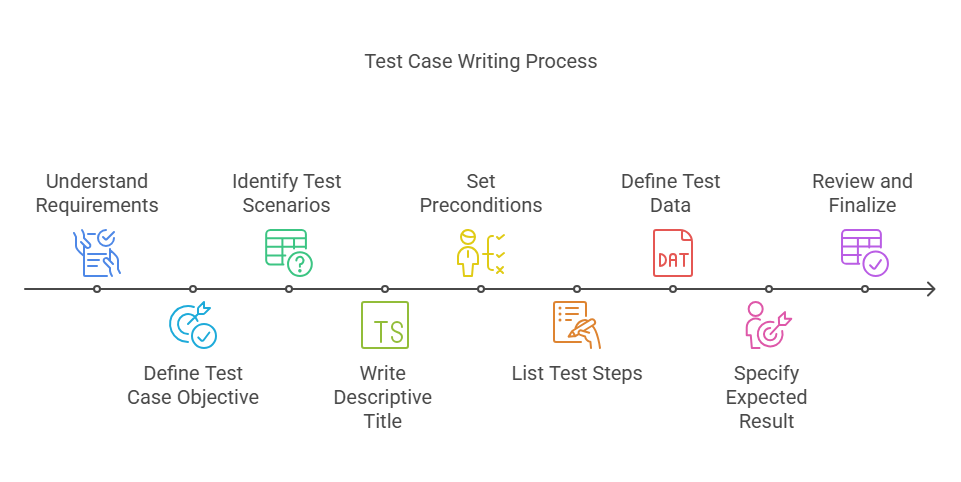
Writing an effective test case involves a systematic approach to ensure that the test case is thorough, easy to follow, and reusable. Here are the steps to writing an effective test case:
Step 1: Understand the requirements
- Review the software requirements specification, user stories, or acceptance criteria thoroughly.
- Identify what needs to be tested and any specific conditions that must be met.
- Clarify any ambiguous or unclear requirements with stakeholders.
Step 2: Define the test case objective
- Specify the purpose of the test case, i.e., what functionality or behavior is being tested.
- Ensure the objective aligns with the requirements and is focused on a specific feature or condition.
Step 3: Identify test scenarios
- Break down the feature or requirement into smaller test scenarios.
- Consider both positive (expected behavior) and negative (unexpected behavior) scenarios.
- Include edge cases, boundary conditions, and variations in input data where necessary.
Step 4: Write a descriptive test case title
- Write a clear and concise title that briefly describes the purpose of the test.
- Ensure the title is specific enough to quickly convey what the test case is about.
Step 5: Set preconditions (if any)
- Define any preconditions or prerequisites that need to be met before executing the test.
- This could include user login status, database state, or configuration settings that need to be in place.
Step 6: List the test steps
- Provide a detailed, step-by-step description of the actions needed to execute the test.
- Each step should be clear and easy to follow, outlining exactly what the tester should do.
Step 7: Define the test data
- Specify any input data required for the test case.
- Ensure the data is appropriate for the test scenario and clearly listed in the steps.
Step 8: Specify the expected result
- Clearly state what the expected outcome should be after executing the test steps.
- The expected result should be based on the requirements and define the correct behavior of the system.
Step 9: Include post-conditions (if applicable)
- Mention any post-conditions that should be checked after the test is completed, such as database changes or the status of specific elements in the application.
Step 10: Define Pass/Fail criteria
- Clearly specify what constitutes a successful test (Pass) and what would cause it to fail.
- This helps testers determine the outcome without ambiguity.
Step 11: Review the test case
- Review the test case with peers or stakeholders to ensure it is clear, accurate, and comprehensive.
- Make any necessary revisions to improve clarity, coverage, or alignment with requirements.
Step 12: Add relevant attachments (optional)
- If helpful, include screenshots, diagrams, or links to external documentation that provide context or clarify test steps.
Step 13: Assign a unique test case ID
- Give the test case a unique identifier so it can be tracked and referenced easily in test reports or by other team members.
Step 14: Ensure reusability
- Write the test case in a way that it can be reused for regression testing or across different environments.
- Avoid making it too specific to a particular version or configuration unless necessary.
Step 15: Prioritize the test case
- Assign a priority level (High, Medium, Low) to indicate the importance of the test case, helping testers focus on critical functionality first.
By following these steps, you can create effective test cases that are easy to execute, reusable, and capable of validating the required functionality comprehensively.
Common mistakes to avoid

When writing test cases, there are some common mistakes that can undermine the effectiveness of the testing process. Here are some key mistakes to avoid:
Mistake #1: Lack of clarity
Mistake: Writing unclear or ambiguous test steps that are open to interpretation.
Solution: Use simple, concise language and ensure that the steps are easy to understand by anyone, even those unfamiliar with the application.
Mistake #2: Not covering edge cases
Mistake: Focusing only on typical use cases and neglecting edge cases or boundary conditions.
Solution: Include test cases for both normal conditions and edge cases to ensure thorough coverage of possible scenarios.
Mistake #3: Overcomplicating test cases
Mistake: Writing overly complex test cases with too many steps or testing multiple things at once.
Solution: Break down complex test cases into smaller, more manageable steps, and focus each test case on a single function or aspect of the application.
Mistake #4: Test cases without expected results
Mistake: Failing to specify the expected outcome of a test, leaving testers unsure of what constitutes a pass or fail.
Solution: Clearly define the expected results for each test case so testers can easily determine success or failure.
Mistake #5: Not reusing test cases
Mistake: Creating new test cases for similar functionality instead of reusing or adapting existing ones.
Solution: Design test cases to be reusable across different versions or scenarios, particularly for regression testing.
Mistake #6: Writing test cases that depend on each other
Mistake: Making test cases dependent on the results of previous test cases, which can cause a chain reaction of failures.
Solution: Ensure that each test case is independent and can be executed in any order.
Mistake #7: Inadequate test data
Mistake: Not providing or specifying the correct test data needed to execute the test case.
Solution: Always define the appropriate test data or provide clear instructions on how to obtain it for the test.
Mistake #8: Not updating test cases
Mistake: Leaving test cases outdated when application functionality or requirements change.
Solution: Regularly review and update test cases to align with the latest requirements and functionality.
Mistake #9 Skipping negative testing
Mistake: Focusing only on positive test scenarios and ignoring potential failure or invalid input scenarios.
Solution: Include negative test cases that check how the system handles errors, invalid inputs, or unexpected behaviors.
Mistake #10: Ignoring preconditions and postconditions
Mistake: Omitting preconditions or postconditions, which can cause confusion or make the test case difficult to execute properly.
Solution: Clearly define any preconditions (e.g., system state, user login status) and postconditions (e.g., database state) to ensure the test is executed correctly.
Mistake #11: Duplicate test cases
Mistake: Writing redundant test cases that duplicate existing ones, leading to wasted time and effort.
Solution: Review existing test cases before writing new ones to ensure you are not duplicating efforts.
Mistake #12: Not prioritizing test cases
Mistake: Treating all test cases as equally important, leading to inefficient test execution.
Solution: Prioritize test cases based on the risk, criticality, and impact on the business, allowing testers to focus on the most important areas first.
Mistake #13: Focusing only on functional testing
Mistake: Limiting test cases to functional testing without considering non-functional aspects such as performance, security, or usability.
Solution: Include non-functional test cases to ensure the system meets performance, security, and usability standards.
Mistake #14: Too much detail in test steps
Mistake: Including overly detailed instructions for common or trivial actions, making the test case long and difficult to follow.
Solution: Strike a balance between being detailed enough for clarity but not so detailed that it becomes overwhelming. Focus on the critical steps.
Mistake #15: Not reviewing or validating test cases
Mistake: Failing to have test cases reviewed by peers, leading to errors or omissions.
Solution: Have test cases reviewed by team members or stakeholders to ensure they are comprehensive, accurate, and clear.
By avoiding these common mistakes, you can improve the quality, efficiency, and reliability of your test cases, leading to more effective software testing.
Why should you use test case templates?
Using a test case template standardizes your approach and ensures consistency. Templates provide a checklist for including all necessary test case details, aiding the test case writing process. A well-structured test plan combined with a test case template results in comprehensive test cases that are easier to maintain.
Templates contribute to better documentation by providing a structured way to maintain comprehensive records of test cases, which is invaluable for future reference, audits, or knowledge transfer.
Skip the blank page. Download our free test case template.
Test case template — spreadsheet format, covers ID, title, priority, precondition, steps, test data, expected result, actual result, and status. Includes a filled-in example.
Managing test cases
Managing test cases is vital for an organized, efficient, and comprehensive testing strategy. Effective test case management is crucial for maintaining software quality. It's a framework covering planning, designing, executing, and tracking results, not just a place to store test scripts.
Benefits of test case management
- Test case maintenance. Review and update test cases whenever business requirements change, instead of letting them drift out of sync with the product.
- Test case reusability. Remove outdated test cases and update existing ones as the application evolves, rather than writing near-duplicates from scratch.
- Test case prioritization. Organize test cases in a logical, structured way and prioritize them based on business priorities and risk, so critical functionality gets tested first.
- Test case version control. Track changes, status, revisions, and updates over time, so you always know what changed and when.
Adequate test case management confirms that testing initiatives are comprehensive, structured, and aligned with project objectives, and it gives the team a shared, current picture of coverage instead of scattered spreadsheets.
What to look for in a test case management tool
The most useful features of test case management tools:
- Quick creation of test cases using built-in templates.
- Tools to run test cases and record results automatically.
- Automated bug tracking with notifications sent to developers when a defect is found.
- Dashboards for monitoring test and bug progress at a glance.
- Straightforward setup and management of test environment settings.
When selecting a tool, weigh ease of use, integration with your existing stack, collaboration features, and your team's specific workflow. There's no single best answer; the right tool matches how your team actually works.
Popular test case management tools
- TestRail. An intuitive platform for creating test plans and test cases, managing runs, and tracking results, with integrations into Jira and GitHub and built-in reporting dashboards.
- Xray for Jira. Natively integrated with Jira, linking every requirement to its relevant test cases so nothing gets missed. Since developers and testers work in the same ecosystem, visibility and collaboration stay high.
- TestMonitor. Combines test case management with risk management, helping you create and track project requirements while identifying potential issues and their impact before they become problems.
- Zephyr. A SaaS test management solution embedded in Jira for managing the complete testing lifecycle, supporting both manual and automated testing.
Managing test cases day to day
Managing test cases involves a combination of planning, organization, tracking, and optimization to ensure that the testing process is thorough and effective. One common approach to managing test cases is through the use of test management tools like Jira, TestRail, or Zephyr. These tools allow you to create, organize, and maintain test cases in a centralized location, making it easier for teams to access, review, and update them as needed. You can categorize test cases based on features, functionalities, or requirements and track their status throughout different stages of testing, such as design, execution, and results reporting.
Another important aspect of managing test cases is ensuring traceability. This involves linking each test case to specific requirements or user stories so that coverage can be tracked, and gaps can be identified. When managing test cases, it’s also essential to define priority levels, allowing testers to focus on critical areas first, which is particularly useful in time-constrained projects.
Traceability matters here too. Linking each test case to specific requirements or user stories lets you track coverage and spot gaps, rather than discovering them after release.
Version control is also key to maintaining test cases over time, especially as software evolves. Test case repositories should be regularly updated to reflect changes in requirements or new functionalities, ensuring that the tests remain relevant and aligned with the current state of the product. It’s also helpful to periodically review and optimize test cases by removing redundancies, updating outdated information, and ensuring reusability for future testing cycles.
By effectively managing your test cases, you can streamline your testing process, improve efficiency, and ultimately deliver higher quality software. Oh, and don’t forget to report bugs and document your test results. Documenting your test results is crucial, as it helps you track progress, identify trends, and prevent regression. Plus, it's a valuable resource for future reference.
Key takeaways
Writing and managing effective test cases is a critical component of a successful software testing strategy. It starts with understanding the requirements and crafting clear, concise test cases that cover both positive and negative scenarios, including edge cases. By using templates and a solid test plan, teams can ensure consistency, improve efficiency, and maintain high-quality test cases. Regularly review your test case execution and update your test management practices to keep up with evolving requirements.
Ultimately, a structured approach to writing and managing test cases ensures that the software is tested comprehensively, reducing risks, increasing reliability, and supporting the successful delivery of high-quality products.
While writing effective test cases might not be as glamorous as coding the next big app, it's undeniably important, and you can't have one without the other.
Level up your software testing skills
Now that you have the basics down, it's time to level up your test case game. Think of it like unlocking new power-ups in a video game. Here are a few resources to get you started:
- Online courses: TDL School offers comprehensive courses on software testing.
- Testing communities: Join online communities to connect with other testers and share knowledge.
- Books and articles: There are countless books and articles on test case writing and software testing best practices.
Keep in mind that collaboration among test teams and the proper use of test management and test case management tools will drive your success. Learning is a continuous process. Keep exploring, experimenting, and improving your test case writing skills. And most importantly, have fun!
FAQ
Most common questions
What is a test case?
A test case is a documented set of steps that defines exactly what to test, what inputs to use, and what result to expect. It's the smallest unit of testing you can hand to someone else and trust they'll test the same thing, the same way, every time.
How do you write a test case?
Start from the requirement or user story, then work through it in order: define the objective, identify the scenarios (positive and negative), write a clear title, set any preconditions, list the steps, specify the test data, and state the expected result. The step-by-step approach above walks through all 15 steps in detail.
What should a test case include?
At minimum, a unique ID, a descriptive title, preconditions, the test steps, the test data, and the expected result. Priority level, postconditions, and pass/fail criteria round it out for anything beyond a quick check.
How many test cases should you write for a feature?
Enough to cover the typical path, the edge cases, and at least one negative scenario, no more. Piling on redundant or overly granular cases just adds maintenance work without adding real coverage; prioritize by risk and business impact instead of trying to test everything.
What's the difference between a test case and a test script?
A test case is the plan: what to test and what should happen. A test script is the execution layer underneath it, the literal steps (manual or coded) that carry the test case out. See our test script guide for the full breakdown with examples.
Turn these test cases into results
Writing good test cases is only half the job. Our manual testing team can help you execute them consistently, catch what automation misses, and keep your releases moving.